Ankle monitor battery charging is not one habit with one set of rules. The device you were assigned determines how often you charge, how long it takes, and which mistakes are easy to make, and the person who charges a wrist-worn device the way they would charge an ankle unit is going to run into a problem eventually.
Most charging advice stops at “do it at the same time every day.” That is correct and it is not enough. What follows is the part that changes depending on what is actually strapped to you or sitting in your pocket.
Why a Dead Battery Gets Treated as More Than a Mistake
Because a device that stops transmitting looks the same from the outside as a device that was removed.
That is the entire reason this matters. The monitoring system knows the device went dark. It does not know why until someone investigates, and until then a dead battery and a removed device occupy the same category. Our post on what happens if your ankle monitor malfunctions or loses signal covers how those situations get sorted out, and our first month guide covers building the basic daily routine.
Battery Life Is Not the Same Across Devices
Here is where the assigned equipment changes the answer.
The Omnilink OM500 works a lot like your phone. Some days it does not have to work as hard, and the charge stretches further. Other days you put the device to work and it needs more power. Consistent charging keeps you going either way, which is why a fixed spot in your day for charging matters more than any number in your head. It also signals the wearer directly through vibration and audio, so the warnings are hard to miss if you are paying attention.
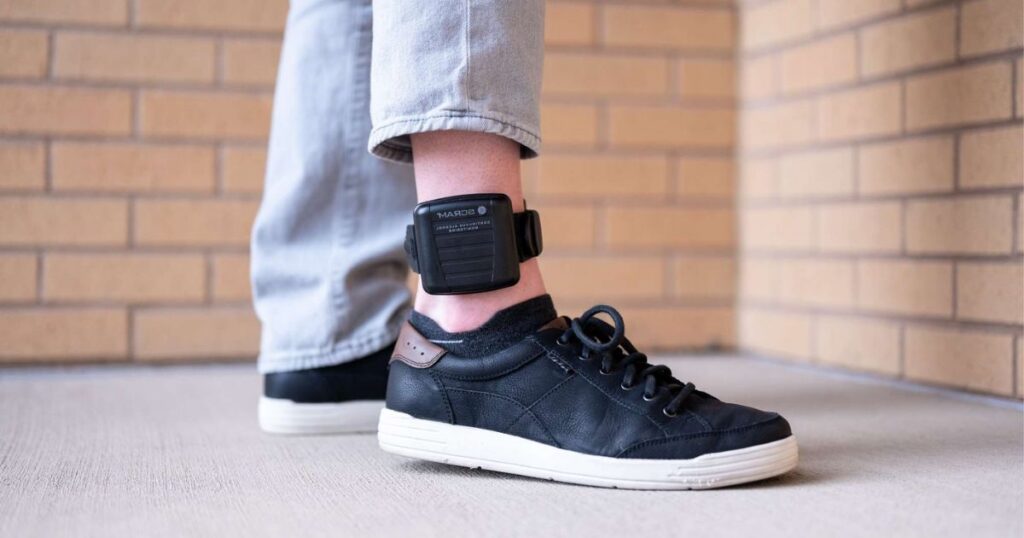
SCRAM GPS uses an internal rechargeable battery that charges from a standard wall outlet. Charging frequency and duration are set by your supervising officer or by A 2nd Chance Monitoring rather than being a single published number, which is worth confirming in writing at installation rather than remembering approximately.
The BI VeriWatch is worn on the wrist, and that changes the daily rhythm more than people expect. A wrist device is in your field of view constantly, which helps, but it also comes off and goes on in a different pattern than an ankle unit, and the charging window has to fit around that.
Soberlink is a handheld device rather than a worn one, so the requirement is different again. It has to be charged and ready at your scheduled testing windows, which means the failure mode is not a dead device at 3 a.m. It is a dead device at the exact moment you are required to test.
Alcohol monitoring worn continuously, such as the SCRAM CAM bracelet, has its own power and reporting requirements that your supervising officer will specify. Do not assume they match a GPS unit you may have worn previously.
If You Are on the Reconnect App, Your Phone Is Now the Device
This is the situation people underestimate most, and it deserves its own section.
The Reconnect app handles check-ins through a smartphone instead of a wearable unit, which sounds easier and mostly is. What changes is that your personal phone battery stops being a convenience issue and becomes a compliance issue. A phone that dies during an afternoon is not an inconvenience anymore.
Three specific things cause problems here, and none of them is forgetting to charge.
- Low power or battery saver mode, which can restrict background activity that the app needs to function
- Aggressive battery optimization settings that the phone applies to apps it decides you are not using
- Permissions getting reset after a system update, which happens quietly and is discovered later
Carry a portable battery pack. Check after every phone update that the app still has the permissions it needs. And if you are the kind of person who runs a phone down to four percent by dinner, that habit now has consequences it did not have last month.
How Much Time Does a Low Battery Warning Actually Give You?
Less than you want, and the honest answer is to stop thinking of it as a countdown.
A low battery alert is not a scheduling suggestion. Treat it as the moment to get to a charger rather than the moment to finish an errand first. The remaining time varies by device, by battery age, by temperature, and by how hard the unit is working to hold a signal in that particular spot, which means the number in your head from last time is not reliable.
Devices that alert the wearer directly, like the OM500, are doing you a favor. Respond the first time.
Charging Around Long Shifts, Long Drives, and Overnight Trips
The routine advice assumes a predictable day. Plenty of people do not have one.
For a double shift or a twelve-hour day, the charging window usually has to happen at work. Ask your employer about an outlet and a place to sit during a break before you need it, not during the shift where it becomes urgent. Most employers say yes to this because it costs them nothing.
For long drives, a vehicle outlet with the correct equipment can work, but confirm with A 2nd Chance Monitoring or your supervising officer that your specific setup supports it rather than improvising at a rest stop.
For any overnight trip, pack the charger first, before clothes. A charger left on a nightstand two hours away is one of the more common ways a compliant person ends up with a violation to explain. Bring the original equipment, not a similar-looking cable from a drawer.
What Weather and Age Do to a Battery
Batteries are chemical, and chemistry responds to temperature.
Cold weather reduces how long a charge lasts, so a device that comfortably made it through a September day may not make it through a January one on the same schedule. Heat is harder on the battery over time, which matters in a Georgia summer and matters more in a parked car.
Age does the rest. A battery that held a full day at installation may hold noticeably less after several months of daily cycling. If you notice you are cutting it closer than you used to, that is worth reporting rather than compensating for quietly. Equipment that is degrading is a service issue, and reporting it early is how it stays a service issue.
When the Charger Is the Thing That Failed
Chargers fail more often than the devices do, and they fail in ways that are easy to miss.
A frayed cable, a loose connection, or an outlet that stopped working can all look like a device problem. If a charge does not seem to be taking, check the outlet with something else before assuming the worst, then contact A 2nd Chance Monitoring immediately.
Do not substitute a cable or adapter that looks compatible. Monitoring equipment is not standard consumer hardware, and the wrong power source can fail to charge properly while appearing to work, which produces exactly the situation you were trying to avoid.
Power Outages and Storms
Georgia summers produce outages, and an outage during your normal charging window is a real scenario worth having a plan for.
If the power goes out and you cannot charge, call your supervising officer and A 2nd Chance Monitoring while it is happening rather than explaining afterward. A documented outage reported in real time is straightforward. The same outage described three days later, after an alert has already been reviewed, is a much harder conversation.
If you have access to a vehicle or a battery pack and have confirmed that option is approved for your device, use it. If you have not confirmed it, ask now rather than during the storm.
Frequently Asked Questions
How long does an ankle monitor battery last?
What happens if your ankle monitor battery dies?
Does the Reconnect app drain your phone battery?
Can you charge an ankle monitor in a car?
What should you do if the power goes out and you cannot charge?
The Habit That Actually Prevents Problems
Reliable ankle monitor battery charging comes down to knowing your specific device rather than following general advice. Find out the exact requirement for the equipment you were given, in writing, at installation. Build the charge into a fixed point in your day. Respond to the first warning rather than the third. Keep the original charger with you when you travel, and report a battery that is not lasting the way it used to instead of working around it. Almost every battery-related compliance problem is preventable, and almost all of them come from treating the device like a phone rather than like a court obligation.
About A 2nd Chance Monitoring
We believe everyone deserves a second chance. A 2nd Chance Monitoring provides alcohol monitoring, GPS tracking, and communication services to help individuals stay accountable while they navigate legal requirements or work toward personal goals. With multiple locations across Georgia, Alabama, and Mississippi, our team offers professional support and reliable technology you can count on 24/7. Whether you’re fulfilling a court order or simply looking for structure during a difficult time, we’re here to help. Get in touch with us today.
The information in this article is provided for general educational purposes only and does not constitute legal advice. Device specifications, charging requirements, and reporting procedures vary by equipment, by county, by court, and by individual case, and your supervising officer or A 2nd Chance Monitoring will provide the requirements that apply to you. If you have specific legal questions about your situation, please consult a licensed attorney in Georgia. A 2nd Chance Monitoring provides electronic monitoring services and does not provide legal representation or legal advice.