
One of the biggest sources of anxiety for people on electronic monitoring is not the device itself. It is what happens when something goes wrong with it. A dead battery. A lost GPS signal inside a building. An error message that will not go away. These things happen, and when they do, many people panic, unsure whether they are about to be treated as a violator for something completely outside their control.
Device malfunctions and signal issues are generally manageable, as long as you handle them correctly. The single rule that applies to every ankle monitor malfunction is the same: report it immediately. What you do in the first few minutes matters more than what caused the problem.
What Counts as a Malfunction vs. a Violation?
This distinction matters a lot. A malfunction is a technical failure that happens to the device. A violation is a failure to comply with the conditions of your release. Both can look the same on the monitoring dashboard, which is exactly why proactive communication is so critical.
Common device issues that are not inherently violations:
- GPS signal loss inside a building, parking garage, basement, or area with dense infrastructure
- A power outage at home that interrupts the charging cycle
- Cellular connectivity issues in areas with poor carrier coverage
- A hardware defect or sensor error with the device itself
- A charging port or cable failure that prevents the device from charging
None of these automatically constitutes a violation. But any one of them can become a violation problem if you do not report it promptly. A monitoring system that shows a gap in GPS data or a dead battery has no way of distinguishing between someone who stayed home the whole time and someone who removed the device. The only way to provide that context is to call.
What to Do When Your Ankle Monitor Has a Problem
The steps are the same regardless of what type of issue you are dealing with.
- Call your monitoring provider first. Do not wait to see if the problem fixes itself. Contact them immediately, even if it is 2am. Document the time you called and the name of the person you spoke with.
- Contact your supervising officer second. Let them know what happened and when. A supervising officer who hears from you before they see an alert in the system is in a very different position than one who sees an unexplained gap and then receives your call.
- Follow up in writing. Send an email or text if your officer accepts them. Written documentation of when you reported the issue and what you said protects you if the situation is later questioned.
- Follow the monitoring provider’s instructions. If they tell you to charge the device, charge it. If they say to wait for a technician, wait. Do not attempt to fix or adjust the device yourself.
A 2nd Chance Monitoring provides 24/7 support for enrolled clients. Call the moment something seems wrong. The team can see the status of your device in real time and help determine whether the issue is technical or whether it needs to be escalated.
Dead Battery: The Most Common Issue
A dead battery is the most frequently reported ankle monitor problem. It is also one of the most preventable.
Most GPS ankle monitors require daily charging. The Omnilink OM500 used by A 2nd Chance Monitoring has a battery life of up to 24 hours, so daily charging is not just recommended, it is essential. Many devices vibrate or flash a warning light when the battery is getting low, giving you time to plug in before it fully drains.
When a device runs out of power, it stops transmitting location data. From the monitoring system’s perspective, this looks identical to a device that was deliberately shielded or removed. The monitoring provider can see your charging history, which helps establish whether a dead battery was an isolated accident or a pattern of neglect. Either way, calling immediately when the battery dies gives your team the ability to document the timeline and provide context.
Build charging into a daily routine. Charging at the same time each day, overnight while you sleep, or during a consistent part of your morning, reduces the chance of forgetting. If you work long shifts, talk to your supervising officer about a charging plan that works around your schedule.
GPS Signal Loss: When the Device Loses Track of You
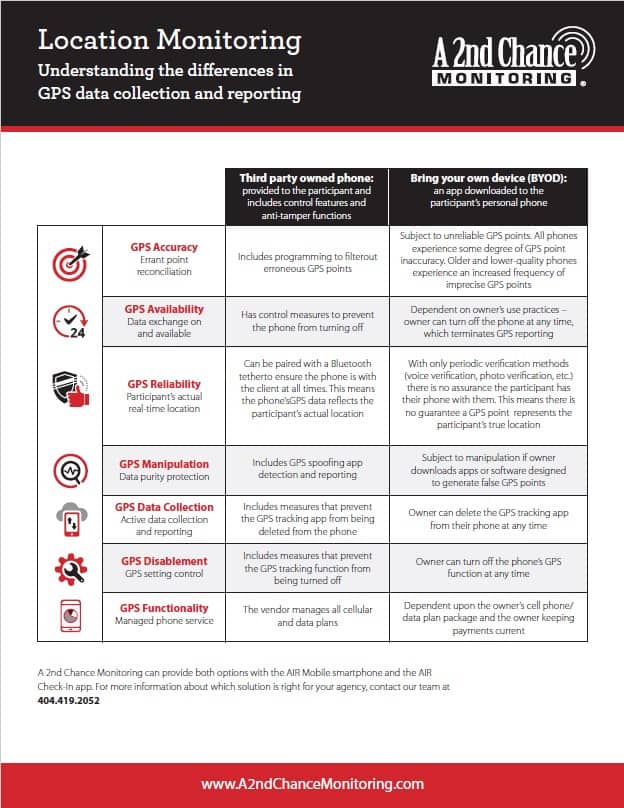
GPS signals rely on satellites, cellular towers, and Wi-Fi networks to track location. In certain environments, the signal can weaken or drop entirely. This is normal in some situations.
Common causes of GPS signal loss include:
- Being inside a building with thick concrete walls, especially basements or underground spaces
- Parking garages and tunnels
- Dense urban areas where tall buildings block satellite reception
- Rural areas with limited cellular coverage
- Severe weather conditions
Brief signal losses of a few minutes typically do not generate violation alerts. Extended losses, generally 20 to 30 minutes or more, can. If you work in an environment where signal loss is predictable, such as a warehouse, hospital basement, or high-rise building, let your supervising officer know in advance. Proactive disclosure of a known signal environment is handled very differently from an unexplained gap discovered later.
The Omnilink OM500 combines GPS, cellular, and Wi-Fi signals to maintain more reliable coverage across a range of environments. But no device is entirely immune to signal gaps, which is why communication remains the most important compliance tool you have.
False Alerts: When the Device Reports a Problem That Did Not Happen
False alerts do happen. Monitoring technology has improved significantly, but it is not perfect. A sensor that detects a possible tamper event when the strap gets wet, or a position error that briefly places you inside an exclusion zone when you were nowhere near it, can both generate alerts that require investigation.
If you receive a call or notification about an alert you believe was generated in error, stay calm and cooperate. Provide your supervising officer with a clear account of where you were and what you were doing at the time in question. The monitoring provider can pull logs, charging history, and signal data to help establish what actually happened.
Keeping a general sense of your daily routine, where you went, when you were home, and when you charged the device, gives you a factual basis to reference if an alert is disputed. You do not need to keep a formal log. But knowing your day helps when you need to explain yourself.
What Not to Do When Something Goes Wrong
A few things make a technical problem significantly worse.
- Do not wait and hope the problem resolves itself. Unexplained gaps in monitoring data grow harder to explain the longer they go unreported.
- Do not try to fix the device yourself. Adjusting, opening, or modifying any part of the device, even with good intentions, can trigger a tamper alert and create a much bigger problem than the original issue.
- Do not cover the device to protect it. Wrapping the device in plastic, foil, or any material is detected as tampering by modern monitoring devices.
- Do not ignore a low battery warning. The OM500 alerts you when the battery is running low. Respond to those warnings immediately.
Frequently Asked Questions About Ankle Monitor Malfunctions
What happens if my ankle monitor dies?
Does GPS signal loss count as a violation?
What should I do if I think I received a false alert?
Can I fix my ankle monitor myself if something breaks?
What if there is a power outage and I cannot charge my device?
How do I know if my ankle monitor is working properly?
About A 2nd Chance Monitoring
We believe everyone deserves a second chance. A 2nd Chance Monitoring provides alcohol monitoring, GPS tracking, and communication services to help individuals stay accountable while they navigate legal requirements or work toward personal goals. With multiple locations across Georgia and Alabama, our team offers professional support and reliable technology you can count on 24/7. Whether you’re fulfilling a court order or simply looking for structure during a difficult time, we’re here to help. Get in touch with us today.
Disclaimer: The information in this article is provided for general educational purposes only and does not constitute legal advice. Monitoring conditions, device requirements, and violation procedures vary by jurisdiction and by individual court order. If you have specific questions about your monitoring conditions or a potential violation, contact your supervising officer or a licensed attorney. A 2nd Chance Monitoring is not a law firm.